Preventing Invalid Date Selection in Oracle APEX

I was doing some paperwork the other day and noticed a small but important detail that might get overlooked in applications: allowing users to pick dates that don't make sense.
For example, imagine a date of birth field where a user selects a future date, or a booking system where a past date is chosen. This can later lead to poor data quality and bugs that aren't immediately obvious.
The good news is that Oracle APEX has a clean way to handle this directly at the Date Picker level, no custom JavaScript or unnecessary validation logic. I'm often surprised by how easily this little enhancement gets overlooked. Well, no more!
In this post, I'll walk through how I typically prevent users from selecting invalid future or past dates using the built-in Date Picker attributes.
The Scenario
Let's say you have a date picker item with the following requirements:
Users must not select future dates in the Date of Birth and Transaction Date fields.
Users must not select a date in the past in the Appointment Date field.
Now, you might be thinking, can't I just add a validation to the page? Absolutely. But there's something deeply satisfying about the calendar itself refusing to let users click on a wrong date. No submission, no error message, no back-and-forth. Just a greyed-out date that simply can't be selected. It's a much cleaner experience, and honestly, it's one of those small details that makes an application feel well thought out.
How to set it up
So, how do we do it? Navigate to your Date Picker item, scroll down to the Settings section in the property editor, and you'll find two key attributes: Minimum Date and Maximum Date. Each one can be set to:
None: no restriction (the default)
Static: a fixed offset relative to today
Item: the value comes from another page item
For the Date of Birth and Transaction Date fields, where we want to block future dates, set Maximum Date to Static, and then set Maximum Static to +0d.
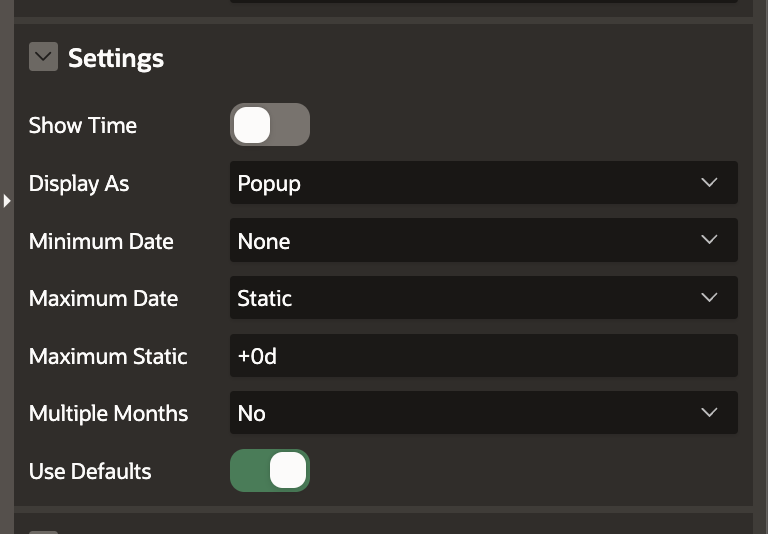
That +0d is doing the heavy lifting here. It means today, plus zero days, so today is the furthest date a user can select. No tomorrow, no next week. Done. If you wanted to allow up to yesterday only, you'd use -1d. Need to cap at the end of last month? There's a format for that too.
For the Appointment Date, we flip it: set Minimum Date to Static and Minimum Static to +0d. Now users can only pick today or a future date. Past appointments are off the table!
The "Item" option:
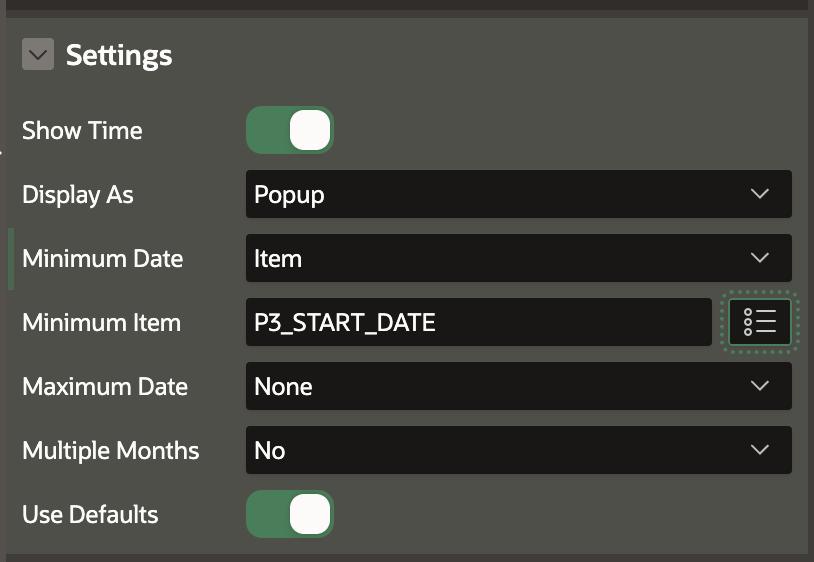
The Item option is where things get even more interesting. Say you have a start date and an end date picker on the same page. You can set the end date's Minimum Date to Item, point it to your start date item, and APEX will automatically prevent users from selecting an end date before the start date. No extra steps. Just two settings and you're done.
It's a small thing, really. A few clicks in the property editor. But these are the kinds of details that quietly separate a polished application from one that just technically works. And the best part? Your validation logic stays clean because you're not catching mistakes after the fact, you're making them impossible in the first place.